Monday, December 30, 2013

With a greater number of TVs than you could shake a stick at, Samsung’s booth at the CES 2013 was really amazing, and now that the CES 2014 is just around the corner, we are having the same expectations from Samsung this time around. Their booth is expected to be the same this time as well. The company has recently made an announcement confirming that it is going to be bringing out the 105-inch curved UHD TV to CES 2014 which is around two weeks away.


The TV has been names as the “most curved” 105 inch TV by Samsung and this must be giving a little counter to LG with its own 105-inch curved TV which was announced earlier this week. The 21:9 aspect ratio on this new TV by Samsung is similar to what has been featured on the 105 inch TV by LG. Moreover, the display itself boasts 11 million pixels for a screen resolution of 5120 x 2160.

Samsung to show 105-inch Curved UHD TV at CES

By: Admin on: 5:59 PM

Sunday, December 29, 2013

A new Samsung Galaxy S5 concept showcases a beautiful metal design, something that the real Galaxy S5 could have on board when it arrives on shelves to replace the current Samsung Galaxy S4.

Rumors suggest that a Samsung Galaxy S5 is on the way to replace the current Galaxy S smartphone, the Samsung Galaxy S4. Reports point to a launch early next year with a release taking place in March or April. They also point to a souped up device that could potentially come with one feature that consumers have been waiting for for years.


Samsung’s next Galaxy S smartphone is thought to have Android 4.4 KitKat on board, a display that features better resolution and perhaps a small size increase, a Snapdragon 800 processor from Qualcomm, a 16MP camera, and quite possibly, a premium metal design, something that consumers have been campaigning for for years.

That still isn’t set in stone, Samsung does a great job of keeping its smartphone designs under wraps, but we’ve seen a number of designers come up with their own visions of a metal Galaxy S5. The latest from Hassan Kaymak, courtesy of Concept-Phones, depicts a beautiful metal Galaxy S5 that certainly ranks up there with the best Galaxy S5 concepts that we’ve seen.


The design is reminiscent of the HTC One’s aluminum design and it shows what a Samsung-made metal smartphone could look like should one arrive on shelves next year. Of course, there is no telling how close Kaymak’s design is to the real Galaxy S5 as the design still hasn’t leaked out to the surface and likely won’t until much closer to next year’s launch event.


Rumors are still undecided on the design of the real Galaxy S5. We’ve seen reports suggest a design that features a premium metal form factor, we’ve seen rumors suggest a Galaxy Note 3 plastic design and we’ve heard reports suggest that Samsung will debut both. Recently, a rumor suggested that the Galaxy S5 would not feature a metal design due to production issues.


With a Galaxy S5 launch rumored for February or March, consumers will likely be in the dark for several weeks and will instead have to rely on concepts to fuel their anticipation.

Samsung Galaxy S5 Concept Showcases Metal Design

By: Admin on: 2:32 AM

Saturday, December 28, 2013

If you did not format your flash drive, then check whether the files are not in

hidden mode. Follow the following steps.


Step 1: 

Click on the below link and download the file "AutorunExterminator"

http://en.kioskea.net/download/download-11613-autorun-exterminator

Extract it --> Double-click on "AutorunExterminator" --> Plug your flash drive now.

This will remove the autorun.inf files from your flash drive and also from drives.

Step 2: 

Click on "Start" -->Run --> type cmd and click on OK.

Here I assume your flash drive letter as G:

Enter this command.

attrib -h -r -s /s /d g:\*.* 

You can copy the above command --> Right-click in the Command Prompt and

paste it.

Note : Don't forget to replace the letter g with your flash drive letter.

Now press "Enter".

Now check for your files in Flash Drive.


Note:-  cmd it say's "access denied" 

Chances are, you have to run "cmd" as an administrator. When you click on the start menu, search for "cmd" in the search field, then right click and "run as administrator". Then use the same command (attrib ...) and it should work fine (other than not being able to change permissions for the "system volume information" directory). 


Make sure the original infected file gets deleted / quarantined or you may end up having the same issues later on.

Step 3: 

After that, download the Malwarebytes' Anti-Malware from the below link

http://en.kioskea.net/download/download-105-malwarebytes-anti-malware

Update it --> Perform "Full Scan"

Note : Default selected option is "Quick Scan".

Good Luck. Share it with your friends :)

How to remove a short cut virus from your Flash drive or your Drive

By: Admin on: 5:53 AM

Friday, December 27, 2013

A wireless network uses radio waves, just like cell phones, televisions and radios do. In fact, communication across a wireless network is a lot like two-way radio communication. Here's what happens:
A computer's wireless adapter translates data into a radio signal and transmits it using an antenna.
A wireless router receives the signal and decodes it. The router sends the information to the Internet using a physical, wired Ethernet connection.
The process also works in reverse, with the router receiving information from the Internet, translating it into a radio signal and sending it to the computer's wireless adapter.
The radios used for WiFi communication are very similar to the radios used for walkie-talkies, cell phones and other devices. They can transmit and receive radio waves, and they can convert 1s and 0s into radio waves and convert the radio waves back into 1s and 0s. But WiFi radios have a few notable differences from other radios:
They transmit at frequencies of 2.4 GHz or 5 GHz. This frequency is considerably higher than the frequencies used for cell phones, walkie-talkies and televisions. The higher frequency allows the signal to carry more data.
They use 802.11 networking standards, which come in several flavors:
802.11a transmits at 5 GHz and can move up to 54 megabits of data per second. It also usesorthogonal frequency-division multiplexing (OFDM), a more efficient coding technique that splits that radio signal into several sub-signals before they reach a receiver. This greatly reduces interference.
802.11b is the slowest and least expensive standard. For a while, its cost made it popular, but now it's becoming less common as faster standards become less expensive. 802.11b transmits in the 2.4 GHz frequency band of the radio spectrum. It can handle up to 11 megabits of data per second, and it usescomplementary code keying (CCK) modulation to improve speeds.
802.11g transmits at 2.4 GHz like 802.11b, but it's a lot faster -- it can handle up to 54 megabits of data per second. 802.11g is faster because it uses the same OFDM coding as 802.11a.
802.11n is the most widely available of the standards and is backward compatible with a, b and g. It significantly improved speed and range over its predecessors. For instance, although 802.11g theoretically moves 54 megabits of data per second, it only achieves real-world speeds of about 24 megabits of data per second because of network congestion. 802.11n, however, reportedly can achieve speeds as high as 140 megabits per second. 802.11n can transmit up to four streams of data, each at a maximum of 150 megabits per second, but most routers only allow for two or three streams.
802.11ac is the newest standard as of early 2013. It has yet to be widely adopted, and is still in draft form at the Institute of Electrical and Electronics Engineers (IEEE), but devices that support it are already on the market. 802.11ac is backward compatible with 802.11n (and therefore the others, too), with n on the 2.4 GHz band and ac on the 5 GHz band. It is less prone to interference and far faster than its predecessors, pushing a maximum of 450 megabits per second on a single stream, although real-world speeds may be lower. Like 802.11n, it allows for transmission on multiple spatial streams -- up to eight, optionally. It is sometimes called 5G WiFi because of its frequency band, sometimes Gigabit WiFi because of its potential to exceed a gigabit per second on multiple streams and sometimes Very High Throughput (VHT) for the same reason.
Other 802.11 standards focus on specific applications of wireless networks, like wide area networks (WANs) inside vehicles or technology that lets you move from one wireless network to another seamlessly.
WiFi radios can transmit on any of three frequency bands. Or, they can "frequency hop" rapidly between the different bands. Frequency hopping helps reduce interference and lets multiple devices use the same wireless connection simultaneously.
As long as they all have wireless adapters, several devices can use one router to connect to the Internet. This connection is convenient, virtually invisible and fairly reliable; however, if the router fails or if too many people try to use high-bandwidth applications at the same time, users can experience interference or lose their connections. Although newer, faster standards like 802.11ac could help with that.

What Is WiFi?

By: Admin on: 5:59 AM

Thursday, December 26, 2013

Symptom
When right-click a file in Windows 7, there is no “Bluetooth” option in “Send to” menu, see Fig.1. How to resolve it?

Fig.1


Affected configurations
The above symptom may occur on the following operating system:

Microsoft Windows 7

 Microsoft Windows 8

Solution
Optimizing system with an optimizer tool or other wrong actions might cause “Send to Bluetooth” shortcut missed. However, this shortcut could be retrieved by the following methods:

Method one: Modeless command

1. Click “Start”,type “fsquirt” and then click “fsquirt.exe” in the result list.

Fig.2 

2. Select “Send files”


Fig.3

Select the device (Phone or laptop) that you want to send your files to


Fig.4

3. Select the files that you want to send


Fig.5

4. Click “Next” to connect the received device and send files.


Fig.6

5. If there is no any Bluetooth device listed under “Select where to send your files”, see Fig.6:


Fig.7

6. Please check whether two Bluetooth-related services are enabled in “Services” Window. ( Press “Win+R” to open “Run” dialogue box, type “services.msc” and click “OK to open “Services” Window)


Fig.8


7. If these two Bluetooth services are “Disabled” or  “Manual” in “Startup” type, right-click them respectively, select “Properties” and set “Startup type” as “Automatic”. Click “Start” under “Service status” and then click “OK”. See Fig.8:


Fig.9

 Method two: Modify “Send to” menu 

1. Click “Start”, type “shell:sendto”, then click “shell:sendto” to open.


Fig.10

 In this “Send to” window, you will see all shortcuts displayed in “Send to” menu and there is no “Bluetooth” icon.


Fig.11 

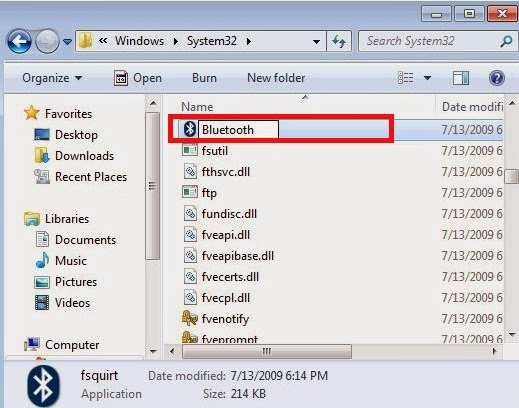
2. Double-click “Computer” icon on the desktop and then open C:\\Windows\\System32. Find out "fsquirt.exe" in “System32” file, and this is the Bluetooth program by which the PC sends a file.


Fig.12


3. Right-click “fsquirt” and select “Create shortcut”. Cope the shortcut and paste it to “Send to” file. Right-click “fsquirt” in “Send to” file and select “Rename”. You can rename it as “Bluetooth”.


Fig.13

4. After finishing above settings, right-click the file that you want to send by Bluetooth and you will see “Bluetooth” from the drop-down list.


Fig.14

"Bluetooth" option missing from "Send to" menu in Windows 7 ,Windows 8,

By: Admin on: 7:13 AM

Tuesday, December 24, 2013

Most bloggers begin their adventure in hopes of winning a lot of their blogs. And not without reason. Bodies of people earn a decent amount online. You can too. Earn money with your blog while sitting at home is a dream for most people, and yet , it is also a reality for many . It's not hard , just takes some dedication and proper guidance . In this post I talk about monetizing your blog to make money online.


Before moving forward , not take a look at some of the basics of blogging, we have covered so far.

H

Google AdSense

Google AdSense is perhaps the most famous advertising network, so much so that many people , especially new bloggers do not know of any other except Google AdSense. So naturally, you 'll be the first to apply. Pleasant, Google AdSense is a good start for beginners , and every blogger should try at one time or another . However, to win real cash , you should look at a number of other networks.

Google AdSense is generally a CPC network. CPC stands for Cost per click, and means you have a certain amount for each click on their ads . You can also CPM ( cost per impression ) used as an AdSense publisher . CPM gives you a certain amount of the realization of a set of meta Impressions ( ie $ 0.1 per 1,000 impressions on ads or vision ) .

BuySellAds

Google AdSense is good in terms of " get - the - wheel - . Giro concerns But these days , almost all other web sites are approved by Google Adsense , the ad - space and competition, and the cost has led . 's why you little revenue per click.

This is where comes in. BuySellAds BSA does not like Google AdSense. Instead, they are direct ads. There is a market in which you face once you pass the BSA criterion of having over 60,000 unique page views per month . Advertisers can choose from the list , and choose to host their based on your niche yet. This is one reason why you should have a clearly defined niche , as it will be easier for sponsors to your niche to find your blog and advertise. Once you have chosen , you are paid to put an ad for a certain period. Simple, but effective. BSA is one of the major source of income for many intermediate to professional bloggers out there.

Affiliate ads

Affiliate ads are another form of advertising, and are based on fees / commissions. The idea is that a product or service that people actually buy , and then a certain amount you get as a reward for " refer " the buyer is encouraged.

This concept is widely used now . Businesses need to grow, and for that, they need customers. They will do anything to get customers, what products and services online, and even some online companies also offer rewards for referrals. If done correctly , affiliate marketing can be the main source of income.

Often here in parts MBT HostGator coupons with our readers. Hostgator is acting in this case as the host, and anyone who can bring rewards to customers. If you visit their website you will see how you can even earn $ 2000 + a month just for references!

Earn money with your new blog - Making Basics

By: Admin on: 11:53 PM
Right . So here is a topic that has been dragged through now . Around long But it never seems to go out of fashion , like every year more and more people are entering the blogosphere . Recent trends have changed mentalities oriented employment , and have inspired entrepreneurship. Therefore, it is high time that people need to look for alternative sources of income , or even a productive hobby that they are rewarded for their time and effort . Therefore, in this post , we'll walk through the new users in creating and making your first blog , and choosing the platform.

It is worth blogging ?

That depends on how you do it in reality . The key behind blogging is hard work and dedication . Each job has two ingredients , but blogs are more than anything . If you are willing to give to your blog, 365 days a year , a couple of hours or so each day, only then can you expect to get . Decent pay check

Reward is something that comes later . So blogging determination necessary to wait for the time with all the hard work and without hope of an immediate reward. Numerous people on blogs simply because they want to " get rich quick " . Do you realize that there is no easy way out. And if you prefer not to invest so much time and effort then I am afraid that blogging is not for you .

However , if you want , and you want to create your own blog then this is something that you should read before you blog .

The selection of a platform

This is a very important question that must be resolved before moving forward , because ultimately affect their growth. Although there are several blogging platforms available out there , two of the most used and recommended are Blogger and WordPress .

The debate between Blogger and WordPress are many , and one that never ends . In fact , different people have different opinions and different reasons for holding one of the two platforms . However, the decision is ultimately down to the type of user you are and what you do with your blog .

Blogger

Blogger is the best choice for you if you are a novice user . It is easy to implement , and the learning curve is very comfortable . Blogger is highly configurable and do not need any skill - to use set. Anyone can create a blog. Blogger And best of all , there is little or no investment required . For your blog , you just have to buy , which is worth $ 10 , plus or minus a few dollars a domain name.


Another great thing I like about Blogger is fairly easy to adjust it. There is a code template that can be edited to change . The look of your blog And the application is fairly clean and efficient. Blogger is optimized for search engines with clear social integration .

However, there is a catch . Blogger is limited in the sense that it is not for programmers . Can PHP or ASP scripts are not on your blog, or you can see a database . There is a limit to the number of individual pages , and the number of users you can have.

WordPress

WordPress is a very powerful open source software that can be customized in many ways. And best of all , it supports PHP, so is the number one choice for programmers and web developers. You can make your WordPress site . Highly dynamic content or database applications flexible data Therefore, it is preferred by businesses and companies, where the functionality of the highest priority .

However , the learning curve is pretty steep. WordPress can be difficult and challenging. Even the smallest adjustment can take a lot of time and effort . And because the software is updated , the plugins that you are currently using may not work well with the next update . Therefore, the end result will be a lot of time debugging and find solutions.


WordPress also need to invest a lot of money . You should not just buy a domain , hosting . And if you want full customization , you need to buy a frame. So even startup investment can go up to $ 150 - $ 300 - not to the continued investment in subscription renewal hosting , software , etc. mention .

(Note : There are two types of free WordPress blogs ( www.yourblog.wordpress.com ) , and self-organized ( www.yourblog.com ) free blogs are hosted on WordPress.com , and they are very restrictive as they serve just ... a demonstration of self- hosted blogs ( WordPress.org ) . In this post , we have the self - hosted blogs , which are fully customizable , and WordPress blogs is not free )

So essentially , between Blogger and WordPress , Blogger is the best choice for beginners. WordPress requires a lot of time, effort and resources . But Blogger is free ( except for the domain) . Not that Blogger blogs can not professional. This blog is run on Blogger . And you can see how much customization you've done . So WordPress is best for the websites of the business and corporate sector , while Blogger is better for people who have little or no experience in the development. Therefore, we suggest you choose Blogger and WordPress does not .
Your First Blog

Creating a Blogger blog is very simple.

  • Login or register with Blogger.com
  • Once in the Control Panel , click the New button on the left blog .
  • Now you will see a popup window asking you to enter show . Title and the address of your blog Fill in the fields and then select a global template .


  • You are done ! Now you can start writing good content on your blog .


For questions about blogging ? Ask in the comments below , and stay tuned for more of our messages in this series of blogs we will discuss . Different aspects of blogging greetings :)

how to create your first blog - To choose which platform ?

By: Admin on: 11:40 PM


Our Team Members

Copyright © 5G Download | Designed by Templateism.com | WPResearcher.com